Homewind for Karoo 3
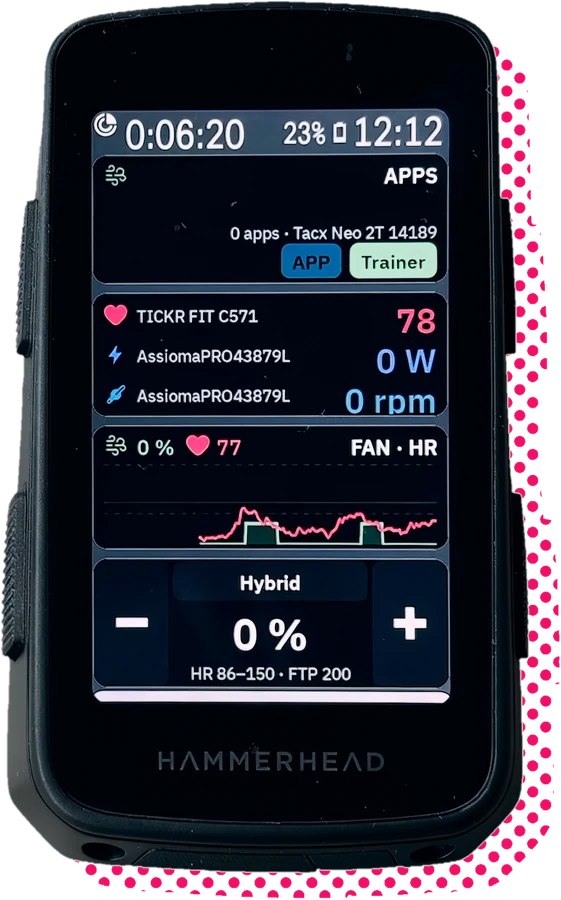
See what Homewind does and change it without letting go of the bars. Fan speed, mode, heart-rate range and sensors show up as Karoo data fields.
Download for Karoo 3 How to set it up
Karoo 3 · Homewind 2.3 recommended · same Wi-Fi · free
What it does
- See your wind. Fan speed in %, mode and the status of every fan, in fields that look like the Karoo’s own. The colours match the Homewind Touch.
- Change it on the go. Plus gives more wind, minus less: both shift your heart-rate range by 5 bpm, the same as on the Touch. A third button switches Pure → Smart → Hybrid. Put them on your AXS bonus buttons, on Blips, or tap them on screen.
- Watch the ride. A graph shows fan speed and heart rate over the last 10 minutes, with your heart-rate range as dashed lines. You see when the fan kicked in and why.
- No extra Bluetooth device. The Karoo talks to Homewind over your Wi-Fi. Your sensors stay where they are.
Got a Karoo 3? Take Homewind Basic
The Karoo already sits on your bars. With the extension it shows and controls what the touchscreen version does, so the tiny computer without display for about €10 is all you need. It can sit anywhere near your bike. Homewind Touch works with the Karoo too if you want both displays.
Data fields
Thirteen fields, all under Extensions → Homewind in the Karoo’s profile editor. The previews in the field picker play a short example ride, so you see what each one does before you pick it.
| Field | What you see |
|---|---|
| Fan · numeric | Fan speed, mode and one dot per fan |
| Fan · zone colour | The whole tile changes colour with fan speed, from blue to pink in 10 % steps |
| Fan · control | Wide field: minus, mode, fan speed, plus, and your heart-rate range below |
| Fan · minus plus | Just the two keys |
| Fan · mode | Current mode; tap to switch |
| Fan · plain number | Fan speed as a regular Karoo number field |
| Graph · fan and HR | Fan speed as a green area, heart rate as a pink line, last 10 minutes |
| Graph · zones | Fan speed as coloured bars, heart rate as a white line |
| Sensors | Every sensor Homewind passes on: name and value |
| Sensor · HR / power / cadence | One sensor per field |
| Apps | Whether an app like Zwift and your trainer are connected. Tap for a QR code to the Homewind settings on your phone |
The fan dots work like on the Touch: green = running, white = connected but off, orange = not reachable, grey = empty slot.
Control from the bike
Three Karoo actions for your buttons:
| Action | What happens |
|---|---|
| Homewind + | More wind: your heart-rate range moves 5 bpm down, so the fan starts earlier |
| Homewind − | Less wind: the range moves 5 bpm up |
| Homewind mode | Pure → Smart → Hybrid → Pure. Without a power source Homewind skips Hybrid |
Which buttons work: bonus buttons on SRAM RED AXS and Force AXS shifters (short and long press) and AXS Wireless Blips (short press). Set them up on the Karoo under Sensors → your AXS groupset → Configure Controls → Karoo Action → Homewind.
No AXS? Use the Fan · control or Fan · minus plus field and tap.
At 50 or 200 bpm the range can’t move further. The key turns grey until you go the other way.
What you need
- Hammerhead Karoo 3. Older Karoo models are not supported.
- Homewind firmware 2.3 and extension 0.5.0 or later. 2.0 to 2.2 work too, but then the Karoo uses one of Homewind’s two browser connections, so only one browser fits next to it.
- Same Wi-Fi for Karoo and Homewind. Homewind runs on 2.4 GHz, the Karoo can be on 2.4 or 5 GHz.
- Wi-Fi on during the ride. The Karoo turns Wi-Fi off when you open the ride app. Swipe down and turn it back on; it stays on while you record.
- Optional: SRAM AXS shifters with bonus buttons or Wireless Blips.
Set it up
About five minutes, no cable needed.
- Install. On your phone, open the download link and share it to the Hammerhead Companion app. The Karoo installs Homewind. Updates appear on the Karoo by themselves.
- Connect. Open Homewind on the Karoo and tap Search Homewind. It shows up as homewind-xxxxxxxx. Not found? Type its IP address; the Homewind web interface or your router shows it.
- Test and save. The Karoo checks the connection and shows Homewind’s name and version. A QR code to the Homewind settings appears below.
- Add fields. Profile editor → tap a field → Extensions → Homewind.
- Map buttons (optional). Sensors → your AXS groupset → Configure Controls → Karoo Action → Homewind.
- Ride. Swipe down in the ride app and turn Wi-Fi on. The fields connect within seconds.
Tip: give Homewind a fixed IP address in your router. Then the Karoo finds it every time.
Questions
The field says Offline or the search finds nothing.
The field says Wi-Fi off.
Does the Karoo take one of the browser connections?
Basic or Touch if I have a Karoo 3?
Do I need the Karoo connected all the time?
Can I change other settings from the Karoo?
Do I need a Karoo to use Homewind?
Is it open source?
Hammerhead®, Karoo® and SRAM® AXS® belong to their owners. Homewind is an independent project and not affiliated with them. The extension is free and comes without warranty; you install and use it at your own risk. Details (German)